How to Migrate a Site From Webflow to Astro
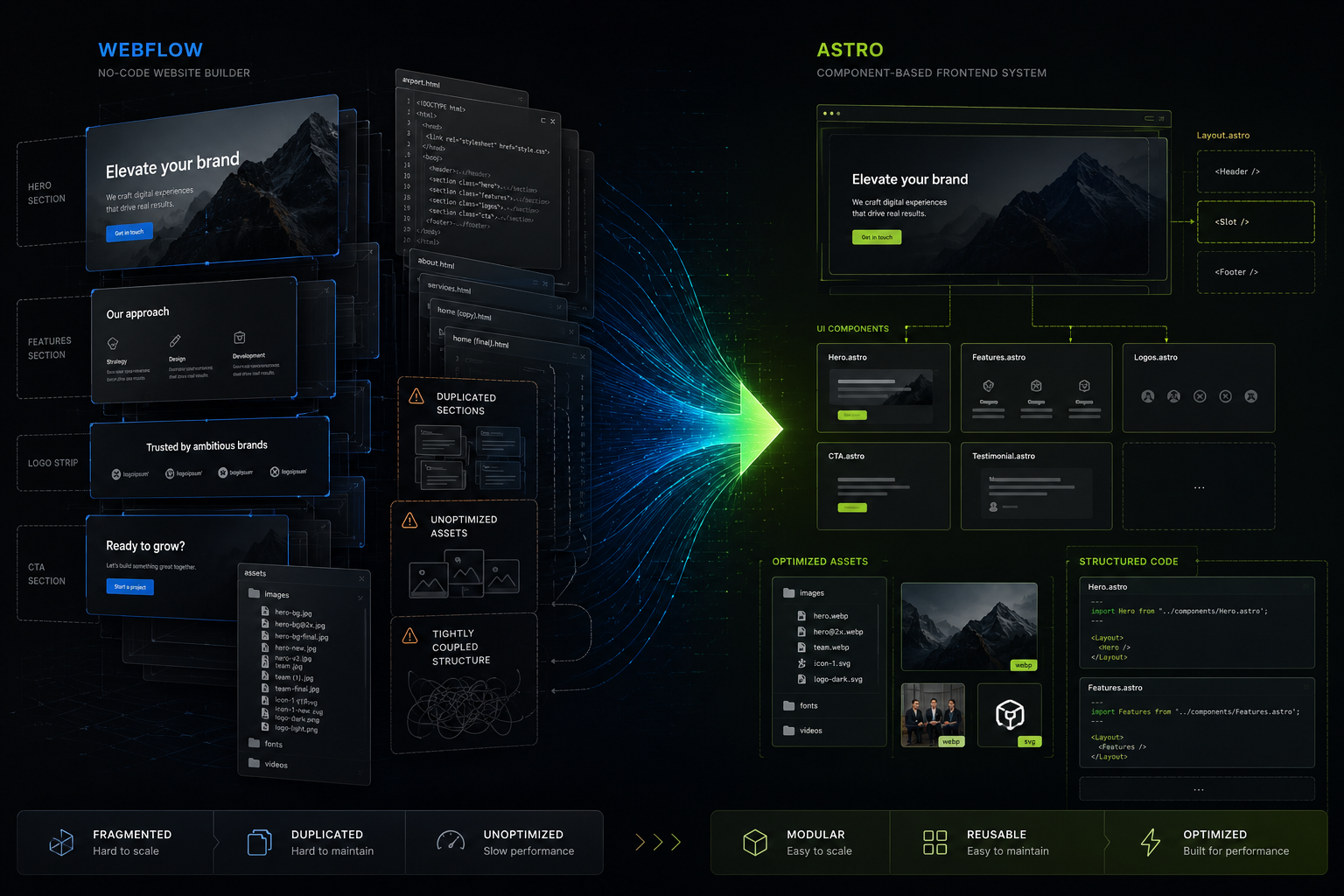
Most Webflow-to-Astro migration advice is too simple. Export the site, copy the assets, wire up a layout, move on.
That may be enough for a small landing page. It is not enough for a real project with a custom theme, content pages, shared sections, and a codebase that someone will have to maintain after the migration.
The exported Webflow code is useful input, but it is not a frontend architecture. My goal was not to preserve Webflow internals. It was to preserve the approved design, content, and behavior while rebuilding the project as an Astro codebase with reusable components, better asset handling, and clearer rules.
This post is about that rebuild: why I moved the site to Astro, what a Webflow export is actually good for, what should be ignored, and where AI agents helped.
Why move from Webflow to Astro
Webflow is good at getting a polished marketing site live quickly. The problem starts later, when the site needs to behave like a maintainable frontend project instead of a visual export. Repeated sections stay duplicated across pages, assets are managed around export paths instead of a bundler pipeline, and even small content changes can mean editing too much page-specific markup.
Astro was a better fit because it let me rebuild the project around components, layouts, and framework-managed assets, with static output and no unnecessary runtime overhead. I was not trying to host Webflow somewhere else. I was moving the project into a different operating model.
What a Webflow export gives you — and what it doesn’t
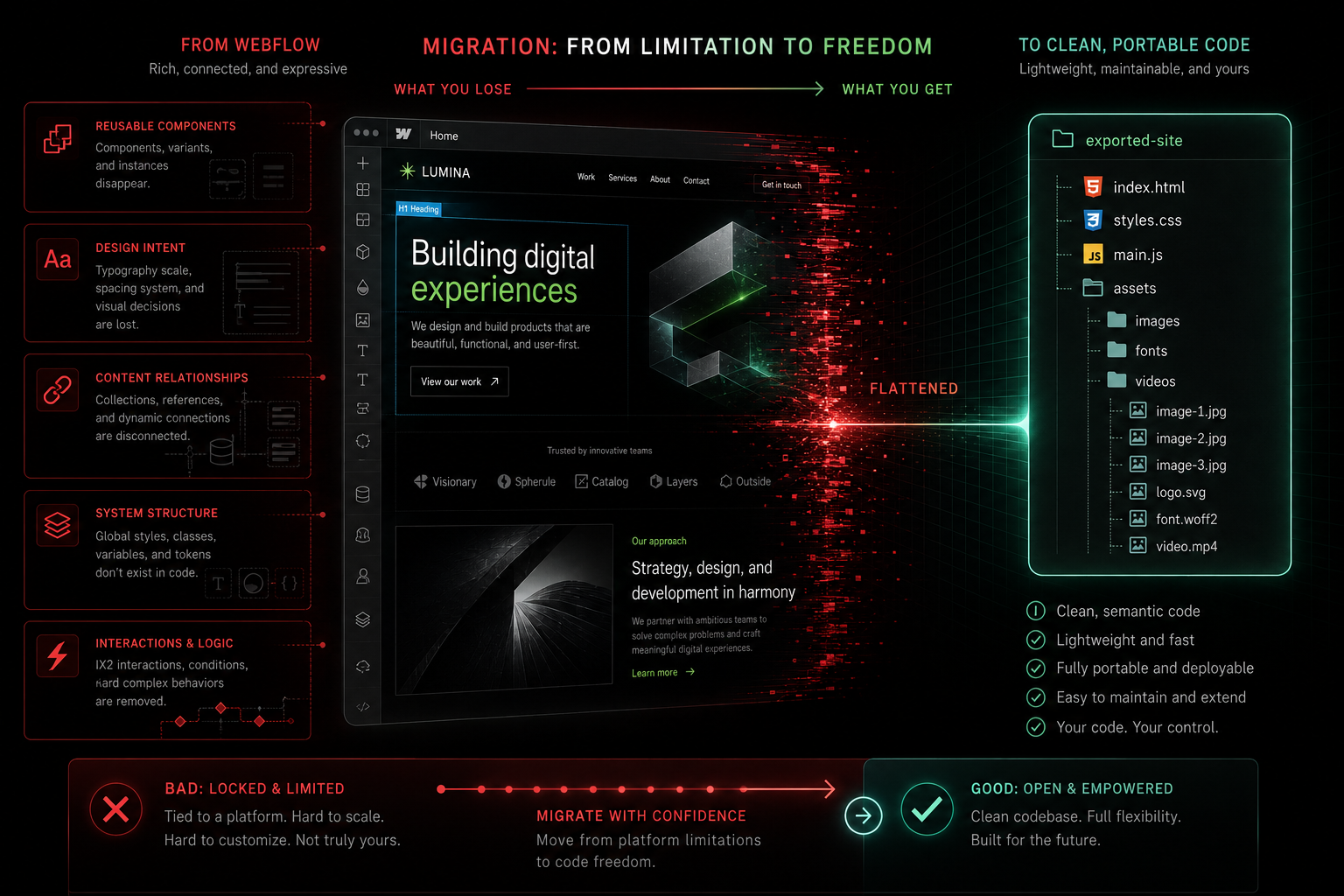
A Webflow export is valuable input. It gives you the latest approved content, the visual reference, the current class names and CSS behavior, page-level structure you can mine for reusable sections, and the latest logos, images, badges, and copy.
What it does not give you is a maintainable codebase. There is no component architecture, no reusable abstraction beyond repeated HTML, and no clean mapping between page structure and long-term ownership. The export is a static snapshot, not the working model that existed inside Webflow while the site was built.
The subtler limitations are the expensive ones. Exported markup carries duplicated blocks and page-specific wrappers that only make sense because of how the page was composed in Webflow. Asset paths are shaped around the export format, not a bundler-first project. Behavior may depend on Webflow conventions that are invisible in the final files, and naming reflects how a page was assembled visually rather than how you would model it in code.
There is also a strategic gap: export gives you output, not intent. You can see what a page became, but not which parts were meant to be reusable, which are temporary, which pages are legacy, or which patterns the team wants to keep. That is why these migrations feel harder than expected — you are reconstructing a maintainable frontend from a visual export format, not moving files.
The migration rule that mattered most
The most important rule was simple:
Do not migrate the export. Migrate the design and content.
In practice that meant using the latest export as the source of truth for content and visual changes, rebuilding repeated blocks as components instead of pasting exported HTML, dropping Webflow-specific data that no longer served the Astro site, and moving assets into Astro-managed locations instead of preserving old paths for their own sake.
Defining the source of truth
One of the best decisions was operational, not visual: I separated the Webflow files from the Astro app itself.
The project treats Webflow exports as local developer reference material:
webflow-exports/latest/— the latest approved export used for migration workwebflow-exports/original/— the original approved site template, kept as a designer-approved pattern library for future pages and layouts
That second folder is not the default migration source; it is inspiration for future Astro work.
Later, I moved those exports into a separate repository and added them back as a git submodule. That kept the main Astro repo smaller, reduced noise in CI, and made the dependency boundary explicit. The app does not depend on the submodule at runtime — it exists only for local migration work. That separation prevents a common failure mode: migration-source files quietly becoming production dependencies.
CMS content needs a separate migration path
Static export is only half the story. If the site uses Webflow CMS, you also need a path for structured content: collections, items, slugs, metadata, and asset references.3
The mental model is clean: Webflow export handles visual migration, while Webflow CMS data handles content migration. This is where MCP helps. On the Webflow side there is now a dedicated Webflow MCP server for working with projects, pages, CMS content, assets, and site data from AI tools. On the Astro side, the useful idea is not “an Astro MCP product” but an MCP-compatible workflow that maps structured content into Astro content files or page inputs — a much better fit for content-heavy sites.
Rebuilding the site into Astro components
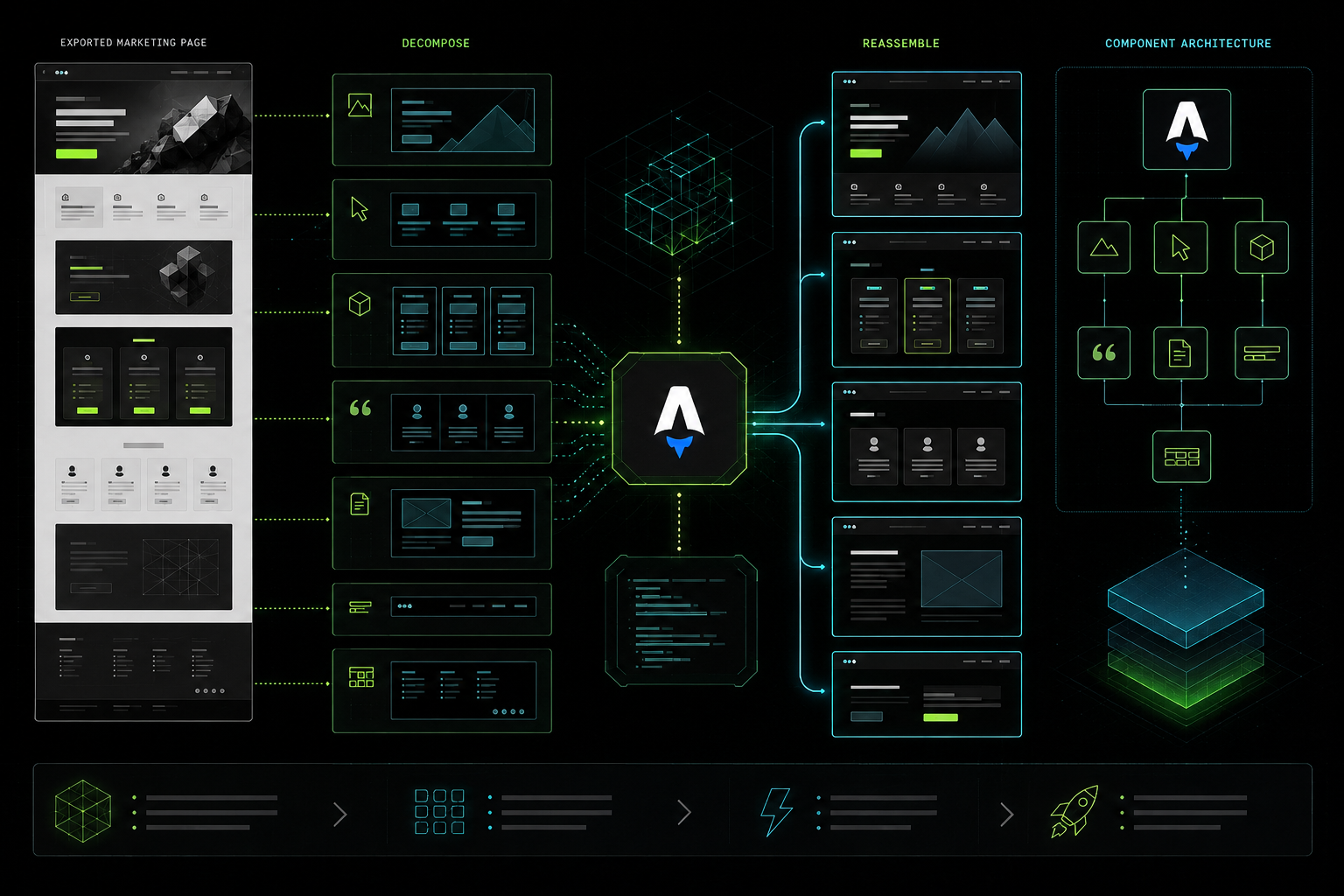
Once the latest export was treated as input rather than implementation, the next step was to identify what should become reusable.
Instead of keeping large page files full of duplicated Webflow markup, I extracted repeatable sections into Astro components: hero sections, pricing blocks, testimonials, CTA sections, and shared content-page wrappers.
This is where Astro becomes more than a static site generator. A homepage looks like one page in Webflow, but in Astro it becomes a composition of deliberately named sections with clear responsibilities. A CTA block stops being copied markup and becomes a component with controlled copy, links, and layout variants.
The payoff is immediate: content changes become targeted, visual consistency is easier to keep, new pages reuse existing building blocks, and future redesigns get cheaper.
Handling a custom theme without dragging all of Webflow with it
This site had a strong visual direction and a lot of custom styling already baked into the Webflow output. That creates a common trap: keeping too much of the old structure because the theme feels fragile.
The better approach was to separate concerns — keep the approved visual result, keep the CSS that still expresses the theme correctly, and remove markup and metadata that only exist because of Webflow’s editor/runtime model.
In practice, that meant syncing the global shell assets first:
src/styles/webflow.csssrc/styles/my-site.webflow.csspublic/js/webflow.js
But it also meant being selective. I deliberately chose not to bring back:
data-wf-sitedata-wf-pagewebflowPageId- body-level page class plumbing that no longer had a clear purpose
If the Astro site does not need that data, keeping it only adds noise and future confusion.
Assets: fonts, images, CSS, and JavaScript
One of the fastest ways to get the migration “done” and the codebase wrong is to dump everything into public/ and stop there. That works in the narrowest sense, but it gives up most of what Astro is good at.
I moved the important assets into Astro-managed locations and updated references so the asset pipeline could manage them:
- fonts into
src/assets/fonts/ - shared images into
src/assets/images/
That matters because hashed asset URLs work reliably in builds, fonts stop depending on brittle public paths, Astro can optimize imported images, and the codebase becomes clear about what is a source asset versus a passthrough static file. It was especially important for homepage images, product cards, and brand graphics — if a page still used raw /images/... URLs from the export, it was easy to end up with stale or inconsistent visuals.
The same pipeline improves CSS and JavaScript delivery. Astro bundles the site CSS more cleanly than a folder of unrelated export files, so it is easier to control what is global, what is shared, and what should stay part of the app build. And a marketing site does not need a large client-side runtime everywhere; the goal was to keep only the scripts that still had a real purpose, not to recreate Webflow’s browser work.
The result: optimized images instead of raw duplicates, cleaner CSS through the app build, less unnecessary JavaScript, and a static site that is easier to keep fast over time.
Some exported pages should not be migrated
Not every page in the Webflow export deserves an Astro route. Exports often contain legacy secondary pages, old originals, temporary pages, and forms or landing pages that are no longer part of the real site structure.
In my case I explicitly ignored some export content during routine updates: archived original pages, pages that only existed in Webflow but were not part of the Astro site, and the exported old-contact-form page unless it was explicitly requested.
Migrations go wrong when “available in export” gets confused with “required in app.” The right default is restraint.
Content pages still deserve structure
A lot of teams focus only on homepage migration quality and treat secondary content pages as leftovers. That is a mistake. These pages still need consistent layout, correct links from the header and footer, clean typography, and stable content sync from the latest export.
In Astro they became easier to manage because they could share wrappers and content patterns instead of living as isolated HTML fragments. They may not be the most exciting pages in the project, but they are where sloppy migrations are easiest to spot.
Using AI agents during the migration

AI agents were useful here, but not in the “push button, get migration” way people imagine. They did not convert Webflow to Astro. They handled the mechanical, repetitive, error-prone work around the actual frontend decisions:
- reviewing differences between the latest export and the Astro project
- tracing where specific images, fonts, and styles were used
- cleaning repeated Webflow leftovers across multiple files
- checking which pages should be ignored during migration
- connecting exported CMS data into Astro-friendly content structures
- updating content in utility pages and verifying stale-asset issues after changes
- updating the internal migration documentation so the same rules applied next time
That saved real time, because migration work is full of small operations that humans do inconsistently once fatigue sets in. But the architectural decisions still had to be explicit: which pages to ignore, what counts as source of truth, when to preserve Webflow behavior and when to drop it, how to organize components, and when to prefer Astro-native assets over Webflow path compatibility.
AI agents are good at enforcing migration policy at scale. They are not good substitutes for defining the policy.
Once the rules were clear, the agents became genuinely useful. Without them, they would have preserved just as much export junk as they removed.
What I would recommend if you are doing the same migration
- Treat the export as reference material, not final implementation.
- Decide early which pages are actually in scope.
- Extract repeated sections into Astro components as soon as you see duplication.
- Move fonts and important images into Astro-managed assets.
- Remove Webflow-specific metadata unless it still serves a clear purpose.
- Keep the latest export and the original template separate if they serve different roles.
- Make migration rules explicit before using AI agents to help.
- Formalize the migration checklist early — every Webflow migration keeps revisiting the same questions (is this page real or legacy? is this asset still used? is this attribute needed?
public/orsrc/assets/? one-off block or reusable component?). - Separate migration-source files from the app repo from day one; the exports-as-submodule setup was the right call, so start there.
That last group matters more than most teams expect. AI is most effective when the project already has strong constraints — latest export is the content source of truth, original template is inspiration only, do not recreate ignored pages, do not restore Webflow IDs and metadata, use Astro-managed images and fonts, prefer maintainability over path-level compatibility. With rules like that in place, AI becomes a useful operator inside the repo instead of a randomizer.
Final thought
The biggest mistake in a Webflow-to-Astro migration is preserving too much of Webflow’s structure. The better approach is to preserve what actually matters — the approved design, the content, and the key behaviors — and question everything else.
Once you treat a Webflow export as source material instead of architecture, Astro becomes a much better home for the site: cleaner components, better asset handling, more control over the theme, and a codebase that is easier to evolve without fear. And if you use AI agents along the way, use them to accelerate the boring work, not to outsource the decisions that define the migration.